Business process orchestration vs. workflow automation
The real difference between workflow automation and process orchestration, and how to know which one your ops team actually needs.

Dhyna Phils
Head of Marketing
Tools
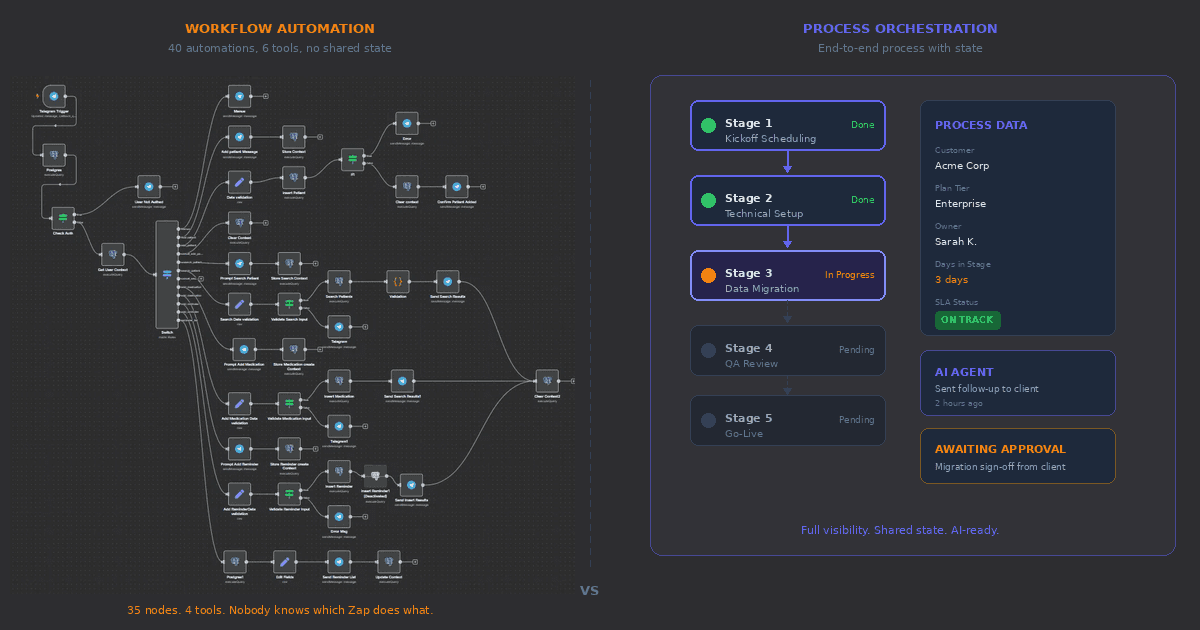
Workflow automation and business process orchestration get used interchangeably in sales decks and product pages, which makes it harder to evaluate what you actually need. They solve different problems at different levels of complexity, and buying the wrong one usually means either outgrowing your tooling within a year or spending six months implementing something your team didn't need yet.
Here's the short version: workflow automation handles individual tasks and simple triggers. Process orchestration manages entire multi-step processes across people, systems, and (increasingly) AI agents. The difference matters because most B2B SaaS ops teams hit a ceiling with automation alone, and the fix isn't more automations. It's a different layer entirely.
What workflow automation actually does
Workflow automation connects a trigger to an action, or a short chain of actions. A deal closes in Salesforce, so a Slack message goes to the CS team. A form submission comes in, so a row gets added to a spreadsheet and an email goes out. A support ticket is tagged "urgent," so it gets routed to the on-call engineer.
These are point-to-point connections. They're good at eliminating repetitive manual steps between two systems or two people. Tools like Zapier, Make, n8n, and native CRM automations handle this well. You define a trigger, set the conditions, map the data, and let it run. Setup takes minutes. Maintenance is low as long as nothing changes upstream.
The value is real. A team that automates 20 manual handoffs saves hours per week and removes the kind of errors that come from copying data between tabs or forgetting to notify someone. For a 10-person team running a small number of concurrent processes, this is often enough.
The problem shows up when the number of automations grows. At some point, usually around the time you have 30+ automations running across four or five tools, you start noticing a pattern: the individual automations all work, but the process they're supposed to support is still fragile. A Zap fires but the downstream automation didn't trigger because a field was formatted differently. Someone changes a Slack channel name and three workflows break silently. A new hire doesn't know which automations exist, so they build a duplicate that conflicts with the original.
This isn't a failure of automation. It's the natural limit of what point-to-point connections can do. They don't know about each other. They don't share state. They can't answer the question "where is this customer in the onboarding process right now?" because that question requires understanding the whole process, not just one step of it.
What process orchestration does differently
Process orchestration starts from the process, not the individual step. You define the full sequence of stages a piece of work moves through, who's responsible at each stage, what data needs to be collected, what conditions trigger the next stage, and where humans need to be involved.
Take customer onboarding as an example. The process might have six stages: kickoff scheduling, technical setup, data migration, team training, QA review, and go-live. Each stage has its own tasks, owners, timelines, and completion criteria. Some tasks can happen in parallel. Others are sequential. Some need a person to sign off before the process moves forward. Others can advance automatically when their conditions are met.
An orchestration system holds the full picture. It knows that customer X is in the "data migration" stage, that the migration task is assigned to an engineer, that it's been sitting for three days, and that the next stage can't start until migration is complete and the customer confirms the data looks right. It knows the whole board, not just one square.
This is fundamentally different from having a Zap that sends a Slack message when migration starts and another that creates a task when migration finishes. Those automations handle two moments in time. Orchestration handles the continuous state of the process and everything in between.
Where the line gets blurry (and where it's clear)
Some products market themselves as orchestration when they're really automation with a visual builder. A drag-and-drop flowchart that chains together API calls is still automation if it doesn't maintain process state, track stage progression, or support human-in-the-loop decision points.
The clearest way to tell the difference: ask whether the tool can answer "show me all the work that's currently stuck in stage 3, who's responsible, and how long it's been there." If the tool can answer that natively, it's doing orchestration. If you'd need to query a database or build a custom dashboard to get that answer, you're working with automation that's been stretched beyond its design.
A few other differences that matter in practice:
State management. Automation is stateless by default. Each trigger fires independently with no memory of what happened before or what's supposed to happen next. Orchestration maintains the state of every active process instance, which means the system always knows where things stand without someone manually checking.
Structured data per process type. In an automation setup, process data lives wherever it was created: a CRM field here, a spreadsheet column there, a Slack message somewhere else. In an orchestration system, each process type has its own typed fields (vendor name, budget amount, delivery date, approval status) attached directly to the process instance. You can filter, sort, report on this data without stitching it together from four sources.
Human decisions as first-class steps. Automation treats human involvement as an interruption: the flow pauses, sends a notification, and waits for someone to do something in another tool. Orchestration treats human decisions as defined steps in the process with their own UI, context, and routing logic. The person making the decision sees the relevant data in one place, makes the call, and the process continues.
Visibility across the pipeline. With automation, visibility means checking each tool individually or building a reporting layer on top. With orchestration, you get a single view of every active process, its current stage, who's working on it, and what's blocking it. This is the difference between a VP of ops asking "how's onboarding going?" and getting an answer in 10 seconds versus getting a 30-minute research project.
When automation is the right call
Automation is the right choice when the work is simple and linear. If your process is "trigger happens, action follows, done," you don't need orchestration. Some examples:
Syncing data between two systems when a record is created or updated. Sending notification emails based on specific events. Creating tasks in a project management tool when a form is submitted. Updating a CRM field when a customer replies to a survey. Rotating on-call assignments on a schedule.
These are real workflows that save real time. They don't need stage management, typed process data, or human-in-the-loop steps. An automation tool handles them well, costs less to maintain, and is faster to set up.
The mistake is assuming that because automation works for these use cases, it will also work for your 8-stage customer onboarding process or your procurement workflow with conditional approvals at two different budget thresholds. Those are different problems.
When you need orchestration
The signal that you've outgrown automation usually isn't dramatic. It's a slow accumulation of friction.
Your ops team starts spending more time monitoring automations than the automations save them. Someone builds a "master tracker" spreadsheet to compensate for the fact that no single tool shows the full picture. New hires take weeks to understand which automations exist, what they do, and how the pieces connect. A customer falls through a crack between stages because the automation that was supposed to hand off didn't fire, and nobody noticed for a week.
The common thread: the process has gotten complex enough that it needs its own system of record. Not a collection of triggers stitched together, but a single place where the process is defined, running instances are tracked, and everyone involved can see the current state.
This typically happens when your process has four or more stages with different owners, when it involves both internal team members and external parties (customers, vendors), when certain steps need human approval based on specific conditions (purchase amount, customer tier, risk level, contract value), or when you need to report on process performance (average time per stage, bottleneck identification, SLA compliance).
How AI changes this decision
Two years ago, the choice between automation and orchestration was mostly about complexity. If your process was simple, automate it. If it was complex, orchestrate it.
AI adds a new dimension. With AI agents, you can now automate parts of a process that previously required human judgment. An agent can draft a vendor outreach email, evaluate whether a customer response requires escalation, or decide the best time to send a follow-up based on the conversation history. These aren't simple trigger-action automations. They're cognitive tasks embedded within a larger process.
This means the right question isn't just "is this process simple or complex?" It's "which parts of this process should be deterministic, which parts should involve human judgment, and which parts can an AI agent handle?" Answering that question requires orchestration, because you need a system that can define different levels of autonomy per step: some steps locked down and predictable, others open to AI reasoning, others requiring a human to review before proceeding.
The companies that are running AI-native operations (and seeing the revenue-per-employee numbers that come with it) aren't just plugging AI into their existing automations. They're rethinking their processes from the ground up, deciding step by step where an agent adds value, and building the orchestration layer that keeps it all accountable and visible.
Choosing the right approach for your team
If you're a small team with simple, linear workflows, start with automation. You'll get immediate value without overinvesting in infrastructure you don't need yet.
If you're managing multi-stage processes with multiple stakeholders, conditional logic, and a need for visibility across the pipeline, you need orchestration. Trying to simulate orchestration with a stack of automations will cost you more in maintenance and missed handoffs than investing in the right tooling.
And if you're somewhere in between, here's a practical test: count how many tools a new team member needs to check to understand the current state of your most important process. If the answer is one, you're in good shape. If the answer is four or five, that's the gap orchestration fills.
Bracket was built for teams at this inflection point: process orchestration with AI agents that handle coordination, follow-ups, and status tracking, while your team focuses on the decisions that need a human.